
Documents on hold
Document verification taking long on the first withdrawal, or extra documents being requested.

Depositing in the cashier takes a few steps; with withdrawals, what decides the timing is usually document verification and bonus status rather than the method. This guide walks through both, step by step.
18+ · Play responsibly
Every deposit and withdrawal is made in the cashier inside your account. The cashier has two tabs, Deposit and Withdraw, and for each method the minimum amount, any upper limit and the estimated processing time are shown on the method card. The information in this guide explains how things generally work; what is binding is the value shown in the cashier at the moment of the transaction.
The Editorbet payment methods available can change over time. On the date of this guide, the main options in the cashier were bank transfer, cryptocurrencies (BTC and USDT) and the e-wallets listed there.
One of the most common payment questions is whether an Editorbet payout is safe. The short answer is that players should take their own precautions with payments: keep balances low and withdraw regularly, within the Editorbet minimum withdrawal for each method. The payment side of this is covered in a separate section below, and the overall assessment of the platform is in the main review.
| Method | Minimum deposit | Minimum withdrawal | Processing time | Fee |
|---|---|---|---|---|
| Bank transfer | from 50 ₺ | from 100 ₺ | 2–24 h | No platform fee |
| Crypto (USDT) | from 100 ₺ | from 100 ₺ | 15–60 min | Network fee |
| Crypto (BTC) | from 100 ₺ | from 100 ₺ | 15–60 min | Network fee |
| E-wallet | from 50 ₺ | from 100 ₺ | 12–50 min | Depends on wallet terms |
Opening the method card in the cashier before a transaction is the only reliable way to see the current value.
Depositing is the most frequent cashier action and with most methods it is completed within minutes. The Editorbet minimum deposit depends on the method; the amount appears on the card once the method is selected. The following order applies to every method:
After logging in, tap the balance area in the top right or the Cashier section of the menu and choose the Deposit tab.
Select bank transfer, cryptocurrency or an e-wallet; the minimum amount and processing time appear on the method card.
Type the amount to deposit; if it is below the minimum, the system will not accept the transaction.
If you want a promotion, select it from the list; if not, leave the offer box empty and your balance stays as cash.
Pay to the account details or wallet address shown on screen; if a reference field is required, fill it in completely.
Once the payment reaches the provider, your balance updates; if it is delayed, contact live chat with the transaction number.
When depositing, the name on the payment method must match the account holder’s name. Deposits from someone else’s bank account or card may require extra verification at withdrawal time or may be returned. This is a point many players overlook: a significant share of payment problems arises when a player uses a payment method that is not in their own name.
The bonus choice is made at the moment of deposit and may not be changeable afterwards. For a player planning a quick withdrawal, a deposit without a bonus is the simpler path, because an active bonus also stretches the Editorbet withdrawal time: withdrawals cannot be made while an active bonus still has wagering to complete. Promotion terms are covered on the bonuses page.
Cryptocurrencies are used for both deposits and withdrawals. The two main assets in the Editorbet crypto options are BTC and USDT. USDT is pegged to the US dollar and is therefore less affected by price swings; BTC is a volatile asset whose value can change during the transaction.
There are three technical points to watch with crypto withdrawals:
For players new to crypto, the safest approach for an Editorbet deposit or withdrawal is to send a small test amount first. Once the test reaches the wallet without problems, sending the main amount keeps losses to a minimum in case of a network or address mistake. If you send directly from a crypto exchange, check the exchange’s own rules on transfers to gambling sites; some exchanges restrict such transfers or review the account.
Crypto withdrawals usually reach the wallet shortly after operator approval, but the total time depends on both the operator’s review and the number of network confirmations. A player who deposits by crypto is usually expected to withdraw by the same method; requesting a withdrawal to a different method may require extra checks.
When bank transfer is selected in the cashier, the account details to pay into and, if required, a reference code for the description field are shown. These details can change with every transaction, so never send money to account details left over from a previous transaction.
The Editorbet minimum withdrawal and minimum deposit for bank transfers are shown separately in the cashier. Processing times depend on bank working hours, weekends and public holidays. Transfers made outside banking hours may only arrive on the next working day, while some fast-payment systems process small amounts around the clock.
If a transfer that meets the minimum has been sent but the balance does not update, first check that the reference field was filled in completely and that the sending account is in your own name. The bank receipt is the document that brings the fastest resolution in a conversation with live chat.
| Situation | Likely cause | What to do |
|---|---|---|
| Balance not updated | Missing reference code | Contact live chat with the receipt |
| Money returned | Sender name differs | Use an account in your own name |
| Transfer delayed | Bank hours, holiday | Wait for the next working day |
| Limit warning | Amount outside the method limit | Change the amount or choose another method |
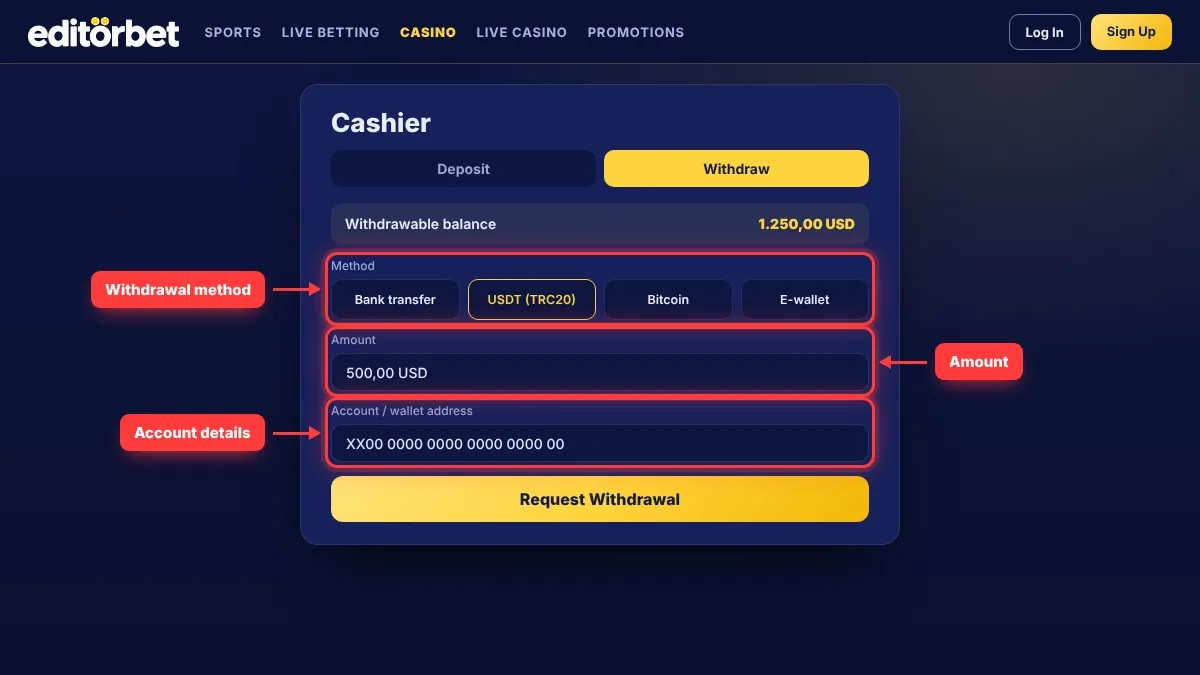
A withdrawal request is created in the Withdraw tab of the cashier, where the Editorbet payment methods for withdrawals are listed. The first step in any Editorbet withdrawal is reading the withdrawable balance correctly: if a bonus is active, not all of your main balance may be withdrawable. The withdrawable amount is shown separately in the cashier.
The screenshot shows the Withdraw tab of the cashier. The highlighted areas are, in order, the withdrawal method, the amount and the account or wallet details; filling in these three fields correctly is enough to keep the request from bouncing back.
If there is a difference between the withdrawable balance and the total balance, it is usually because of an active bonus or unfinished wagering.
Switch to the Withdraw tab in the cashier and check your withdrawable balance.
Where possible, choose the method you used to deposit; changing method may require extra checks.
Type an amount above the minimum withdrawal and not more than your withdrawable balance.
For bank transfer, enter an IBAN in your own name; for crypto, a wallet address on the correct network.
Check the details one last time and submit; the request appears as “pending” in your transaction history.
When approved, the status updates; if declined, the reason is shown in the history or sent by email.
A pending withdrawal — including an Editorbet crypto request — can often be cancelled and returned to your balance. Using that option to play on with the money you meant to withdraw, however, simply postpones the decision; watch out if it becomes a habit that leads to chasing losses. If you change your mind about a deposit you made with a bonus, remember that the bonus terms still apply to the withdrawal.
The Editorbet withdrawal time is the sum of three stages: the operator’s review of the request, the sending of the payment and the money reaching the recipient.
While waiting, following the status in your transaction history is enough — for a withdrawal as much as for an Editorbet deposit; creating new requests for the same amount does not speed things up and can complicate the review. At weekends and on public holidays, both the operator’s review and bank hours can make things slower. For large withdrawals, the operator may run extra security checks and pay the amount in several parts; in that case the payment plan is usually sent by email.
The most effective way to speed up a withdrawal is to complete document verification before your first one. Finishing the wagering on any active bonus, using a payment method in your own name and withdrawing by the same method you deposited with also shorten the time. Using the method of your original deposit is the path that needs the fewest extra checks, and if you funded your account above the Editorbet minimum deposit by bank transfer, withdrawing by bank transfer is usually smoothest.
Document verification (KYC) is often a precondition for a withdrawal to be approved. The documents requested are usually an ID card or passport, a proof of address issued within the last three months and proof that the payment method belongs to you. In some cases a selfie holding your ID may also be requested.
Documents are uploaded in the verification section of the account menu. Photos must be clear, all four corners of the document visible and the document still valid. On proof of a card, cover the middle digits and leave the name and last four digits visible. Verification time depends on demand; registration and verification steps are described in detail in the login and registration guide.
Payout complaints are among the most concrete sources of information about how trustworthy a platform is. Looking through the records on complaint sites, most payment-related issues fall into four groups:
Document verification taking long on the first withdrawal, or extra documents being requested.
A withdrawal requested before wagering was complete, or the maximum bet rule being exceeded.
A deposit from someone else’s account, or a withdrawal requested to an IBAN in a different name.
What matters is not the number of complaints but whether the site responded and solved the problem.
In a dispute, the route runs only through the platform’s own support channels and independent complaint sites. Keeping all correspondence, receipts and transaction numbers is therefore the basis of any complaint. If an Editorbet payout takes longer than expected, first get a ticket number from live chat and then ask about the status in writing by email.
When assessing complaint records, pay attention to dates. Payment problems from an earlier period may not reflect today’s process; the last few months give a more meaningful picture. On the positive side, comments stating that withdrawals went smoothly for players with complete documents stand out.
E-wallets act as an intermediate layer between your bank account and your gambling account. Which e-wallets are active in the cashier changes over time, and no fixed list could be verified on the date of this guide; the current list appears among the method cards in the cashier. Among the Editorbet payment methods, the e-wallet option is an alternative for those who want transactions to show up faster than bank transfers.
Two points matter when using an e-wallet. First, the e-wallet account must also be in the player’s own name and verified. Second, the wallet provider has its own fees and limits, which may not be shown in the platform’s cashier. Anyone planning to use the Editorbet crypto option through an e-wallet should also make sure the wallet supports the relevant network.
Whether the money came from an Editorbet deposit by bank transfer or crypto also matters. Accounts with completed documents, no active bonus and the same method as the deposit usually move faster.
The minimum withdrawal varies by method and is shown on the method card in the Withdraw tab of the cashier.
The main cryptocurrencies in the cashier are BTC and USDT. The list of active coins and supported networks is shown in the cashier; you must send on the network selected there, and the Editorbet minimum deposit for each coin is shown on the same card.
The most common reasons are incomplete document verification, unfinished bonus wagering, a name mismatch and a request to a method different from the one used to deposit. The reason is shown in the transaction history or by email.
No. If the offer box is left empty, your balance stays as cash and no wagering applies to withdrawals.
The information in this guide is current as of 10 November 2026. Methods, limits, processing times and fees may change; the binding values are those shown in the cashier at the time of the transaction.